
An estate agency window has a difficult job. It needs to attract attention from people walking past, show current properties clearly and encourage enquiries even when the office is closed. Traditional printed property cards can do part of that work, but keeping them up to date takes time and they can be difficult to read in changing daylight.
Digital window displays offer estate agents a flexible way to present property photography, key details and local messages. The best results come from planning the screen, content and installation together rather than simply replacing a paper poster with a television. Here is a practical guide for agencies in Newcastle, Northumberland and across the North East.
Start with the viewing conditions outside your office
A screen that looks bright inside a showroom may appear washed out behind sunlit glass. Consider the direction of the window, direct sunlight, reflections from neighbouring buildings and the typical distance between pedestrians and the display. High-brightness commercial screens are designed for demanding window conditions, but the correct specification depends on the site.
Ask an installer to assess glare, ventilation, mounting positions and the visibility of the screen from the pavement. A screen positioned too far back from the glass can lose impact through reflections. It must also be installed securely without blocking exits or creating unsafe cabling.
For an overview of the equipment, see our digital window display solutions for the North East.
Use property photography as the main attraction
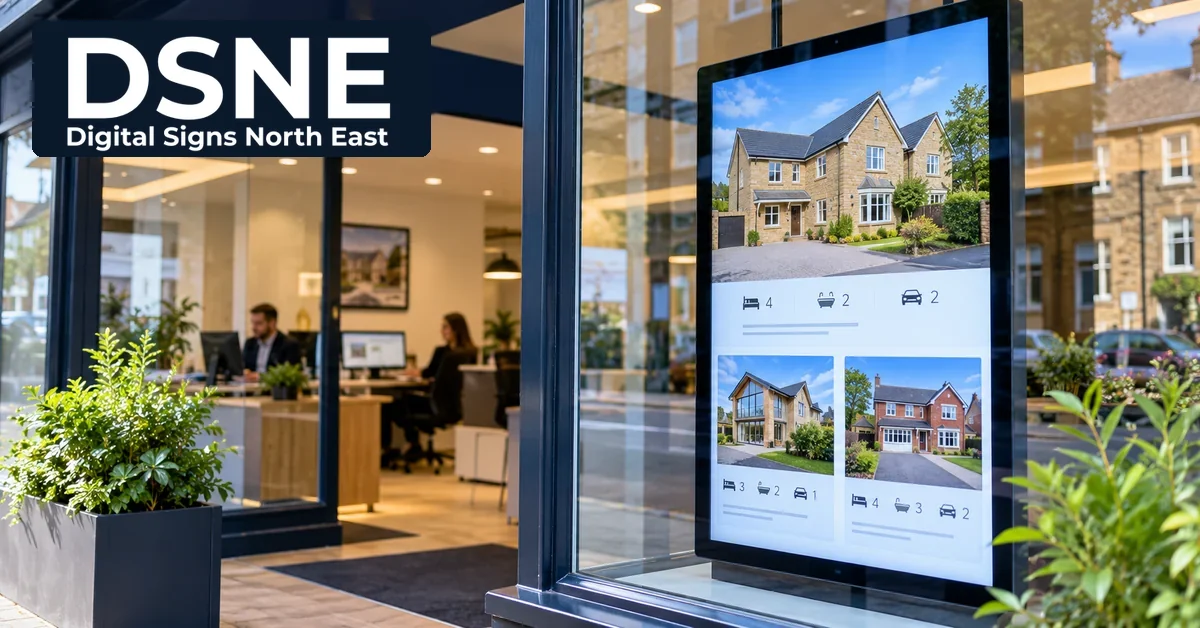
Strong property images do most of the work. Choose a clear lead photograph that shows a home at its best, then add a concise headline, location, price or price guide where appropriate, and a small number of genuinely useful details. Avoid filling the screen with a full listing description that nobody can read while walking past.
A simple rotation might show the front exterior, a standout interior room and a clear enquiry prompt. Keep text large, maintain strong contrast and allow enough time for someone to take in each property. Our digital signage text-size guide explains why viewing distance matters more than the number of words you can fit onto a slide.
Plan portrait and landscape screens around your window
Portrait screens suit narrow window bays and individual property features. Landscape displays can work well for wider shopfronts or side-by-side photography. The right choice is determined by the actual window dimensions, sightlines and what you want people to notice first.
Do not assume that every property photo can be cropped safely into every screen orientation. Prepare separate layouts for portrait and landscape formats, keeping important architectural features away from the edges. Test the finished content on the actual display before rolling out a full playlist.
Keep sold and let-agreed properties current
Out-of-date property listings are frustrating for prospective buyers and tenants. A content management workflow can help an agency replace withdrawn listings, update prices and rotate newly instructed homes without printing fresh cards. However, somebody still needs responsibility for checking accuracy.
Set a simple approval process: confirm that the property is available, check the marketing details against the agency’s approved listing, review the imagery and schedule the change. Remove or update content promptly when the property’s status changes. Digital signage makes updates easier; it does not replace accurate property records.
Balance individual listings with agency messages
A window screen does not need to show properties every second. It can also introduce the agency team, explain valuation services, promote local area expertise or display office opening information. A sensible playlist gives the strongest property imagery most of the attention while adding a small number of brand-building messages.
For example, an agency could show several featured homes, a concise valuation message and a local neighbourhood highlight. Keep each item visually consistent with the agency’s approved colours and logo, and avoid aggressive animations that make property photography harder to appreciate.
Think about content scheduling and branch management
Different times of day can call for different messages. A lunchtime playlist may focus on quick property highlights, while an evening sequence could emphasise online enquiries when the office is closed. If the business has several branches, central control can help maintain branding while allowing each location to feature its own available properties.
Our multi-location digital signage guide covers content permissions, scheduling and brand consistency. Even a single-branch agency benefits from a named person responsible for reviewing and approving screen updates.
Consider power, connectivity and screen reliability
A commercial window display needs safe power, suitable ventilation and a dependable method of receiving content updates. Ask how the screen will be managed, whether it requires a network connection and what happens when connectivity is interrupted. Depending on the equipment and software, some content can remain visible during temporary network loss, but this must be confirmed for the proposed setup.
Commercial displays may support scheduled power-on and power-off times, remote monitoring and suitable brightness controls. These features should be assessed against opening hours, energy use and the building’s operating conditions. A standard domestic television may not be suitable for prolonged high-brightness window use.
Make enquiries easy without cluttering the screen
Every slide should have a clear purpose. For property listings, the agency name and an easy-to-remember website or contact route may be enough. A QR code can be useful where people can safely stop and scan, but it should not be the only way to enquire. Avoid tiny contact details and complex web addresses.
Keep messages legible for people viewing from different angles and distances. Do not rely on sound, flashing effects or long videos to communicate essential information. Clear photography and readable information generally serve a busy shopfront better than excessive motion.
See a real North East estate agency installation
Digital Signs North East has supplied and installed two portrait digital window displays for Riverside Residential. The Riverside Residential project provides a useful example of customer-facing window screens in an estate agency environment.
Every office is different, so a site assessment is the right starting point. The screen size, brightness, orientation, fixing method and content workflow should be selected for the window and the agency’s marketing needs.
Planning a digital window display for your estate agency?
Start with the customer view from outside, then work backwards through property content, screen specifications and installation requirements. A well-planned display can keep listings fresh and present your agency professionally without adding unnecessary daily administration.
Digital Signs North East works with businesses across Newcastle and the wider North East on commercial display solutions. Discuss your shopfront, preferred screen orientation and content update process to plan a system that suits your branch.